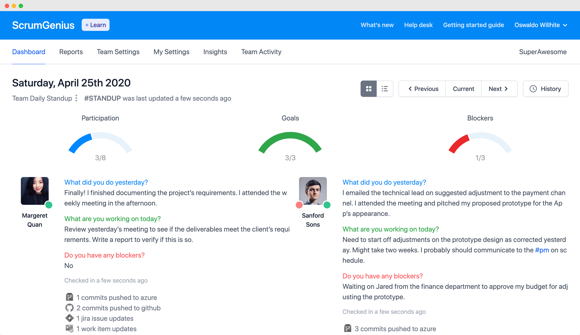
ScrumGenius pings your team members to provide a status update of what they're up to and if they are facing any blockers.

Teams members complete their reports through our bot or the web app. Receive a nicely formatted report summary in your inbox.

Review their answers using our beautiful reports, effectively guide your team on daily tasks and help clear blockers.
Reduce the time you spend in meetings. ScrumGenius delivers all the insights of a typical standup without the wasted time spend on scheduling, tech issues, or delays.
ScrumGenius collects and organises your teams reports that would otherwise get lost in emails, google forms or private DMs.
Using our dashboard, as a manager, you can view the report history of any date. You can also download an excel report for any time range to see the answers grouped together by each day.
ScrumGenius runs automated standups within Microsoft Teams, Slack and Email. We provide a convenient link afterwards also, so you can edit your answer if you made any mistakes.
Configure and run multiple reports on your schedule. Speak your teams language. You can customize what questions you want to ask, the time you want ScrumGenius to ask them and the schedule frequency. So it fits your team.
Use ScrumGenius to effectively lead your team to progress on the daily tasks. Help your team communicate and clear those blockers, with a daily morning standup. Make it a part of your routine just like that morning coffee.
You can manage multiple teams in Microsoft Teams with one ScrumGenius account. We support enterprises with large teams and multiple departments and also educational institutions.
Daily standup by email
Summary email reports
Custom Questions
Email and chat support
Everything in Pro
Custom integrations
Field level encryption
Phone support
Regardless of the team size, we only charge for the unique partipants that you configure across all your reports in ScrumGenius.
Yes! The member check-in forms and reports can be used with desktop, mobile, or tablet. We recommend using the Desktop when using an admin account to configure reports and settings.
Yes! With a single account you can create new teams, belong to other teams, and switch between teams within ScrumGenius.
Yes! A team can be shared with another ScrumGenius admin account. Once shared, they can configure reports and settings
Admins can access the dashboard and see the check-ins from anyone on the team. Members can also access the check-ins through a link upon completion.
Nope! Your team members do not need an account to provide their answers to your check-in. They can check-in through the ScrumGenius bot using your chat plotform, or on the web using a secure link.